Rethinking Virtual Tours: Why Simple, Self-Hosted, and Free is Winning
In the world of digital photography, virtual tours have often felt like a walled garden. For years, if you wanted to create an interactive 360-degree experience, you were forced into one of two paths: subscription-based hosting platforms that host your data for ongoing fees, or powerful but complex high-end software with learning curves that can feel like a mountain climb.
But the landscape is shifting. As 360-degree cameras become more accessible, the need for a streamlined, autonomous way to share these experiences has grown. That’s one reason why I built PanoLite: to prove that creating a fully-functional multi-node tour doesn't have to be expensive, difficult, or tied to a monthly bill. (The other big reason was to give my design students access to a quick and free way to generate tours when they experiment with 360 images.)
Finding Your Place in the 360 Ecosystem
In the panoramic world, we are incredibly fortunate to have powerhouse tools such as KRPano [LINK] and Pano2VR [LINK]. These are the industry standards for a reason; they offer near-infinite customizability and the ability to build massive, complex enterprise tours.
I have massive respect for the developers behind these platforms! They have spent years perfecting the engines that many of us rely on for high-end professional work. However, these ‘powerhouse’ tools come with two significant commitments:
- The Financial Entry Point: For a hobbyist, a small business owner, or a photographer just dipping their toes into 360, the initial software cost can be a hurdle.
- The Learning Curve: These tools are professional-grade software with enormous feature sets. Mastering them isn't just a weekend project, it's a skill set that requires time and dedication to develop.
PanoLite isn't designed to replace these professional suites. Instead, it lives in the space between ‘nothing’ and ‘complex.’
Think of it this way: You don't always need a heavy-duty CAD program when a simple sketchpad will do. If you need a 100-node tour with custom database integration and complex logic,or you’re looking for rich-media enhancements, you should absolutely reach for Pano2VR or KRPano. But if you have a handful of great 360 photos and you need a clean, interactive, multi-node tour ready to go in five minutes? That is where PanoLite shines.
It’s about lowering the barrier to entry so that everyone - from real estate agents to local historians - can share their spaces without needing a degree in XML or a large software budget. It also lets people explore virtual tour creation to find out if they do want to commit to tour building at a higher level.
1. The Power of Absolute Simplicity
The most significant barrier to entry for virtual tours isn’t the photography, it’s the assembly. Most tools require you to navigate complex workspaces or understand coordinate systems just to link two rooms together.
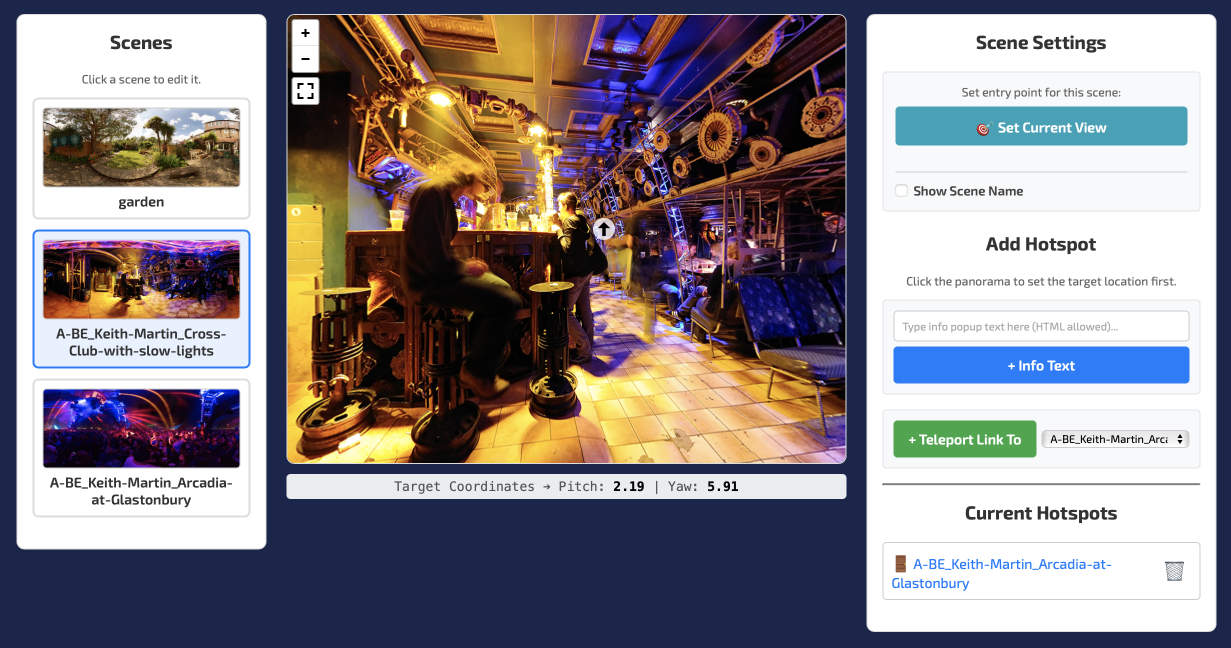
With PanoLite, we’ve reduced the process to its fundamental parts. It is a purely point-and-click workflow. You [1] add your equirectangular JPEG scenes, [2] drag the view to where you want the user to start, and [3] click to place a hotspot. By removing the technical friction, the creator can focus on the storytelling and the space itself, rather than the software.
[Screen grabs of the steps or annotated single grab? Link to another page with specific step guides?]
2. Speed: From Photos to Tour in Minutes
Time is the most valuable asset for any photographer. Whether you are documenting a construction site, showcasing a gallery, or listing a property, you shouldn't spend four hours in post-production for every one hour of shooting.
Because PanoLite processes everything locally in your browser, there are no "uploading" wait times. You can link multiple nodes, add information hotspots, and set your navigation links in the time it takes to drink a cup of coffee. This speed makes ‘micro-tours’ viable: small, 3 or 4-room experiences that might have been too much of a chore to build using traditional methods.
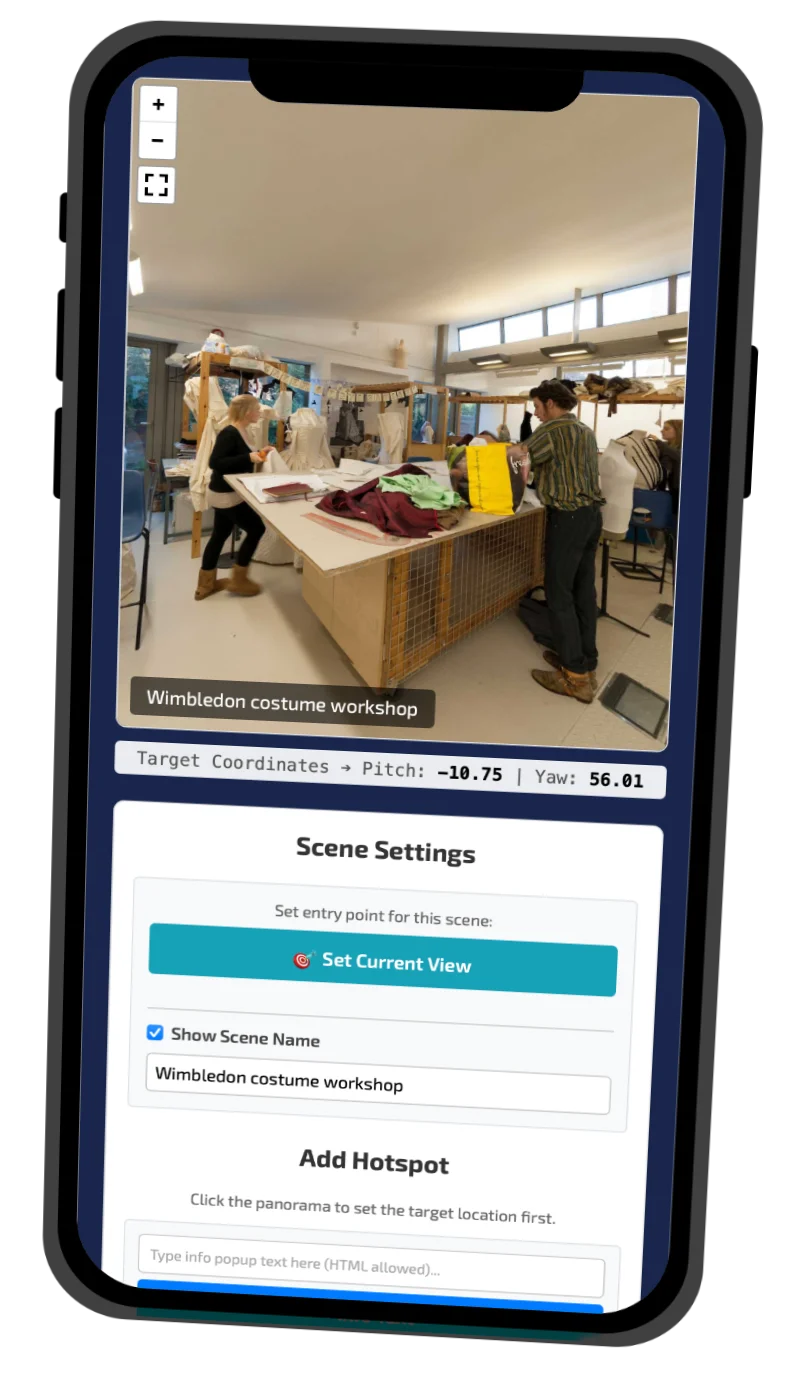
You can do this in any modern browser on any device, even a smartphone while travelling back from shooting 360 images. (Because everything happens locally within the browser - see Privacy by Design, below - older smartphones may struggle with larger sets of images, but modern devices will be fine.)
3. Total Autonomy: Owning Your Output
Perhaps the biggest issue with modern SaaS (Software as a Service) tour builders is the lack of final ownership over the publishing process. It’s an understandable situation, but still, if you stop paying your monthly subscription, your tours - and your hard work - disappear from the web.
PanoLite operates on a different philosophy: Autonomy.
- No Hosting Ties: I don't host your tours, which means I don't control or gatekeep them.
- Flexible Exports: You can export a lightweight ZIP file ready for any web server, or a standalone ‘Local Offline’ HTML file.
- Kiosk Ready: The standalone HTML export encodes the images directly into the code, making it the perfect standalone kiosk-style solution for trade shows, events, or any other situation where internet access might be spotty or non-existent.
4. Privacy by Design
In an era of data concerns, PanoLite offers a unique advantage: your images never leave your computer during the build process. Most online builders require you to upload your 360 photos to their servers for processing. PanoLite uses modern web APIs to do all the heavy lifting in your browser's local memory. Your privacy isn't just a policy; it's baked into the architecture of the tool.
5. Built on Open Source Foundations
While PanoLite is designed for simplicity, it doesn’t sacrifice power. The engine under the hood is Pannellum, a respected, lightweight, open-source panorama viewer.
Because the exported tours use the Pannellum framework, they aren't ‘black boxes.’ If you are a developer or a hobbyist who wants to go deeper, you can open the exported files in any text editor and customize them further using the official Pannellum documentation. It is a tool that grows with you: simple enough for a beginner, but extensible enough for a pro.
Why ‘Free’ Matters
There is no ‘Pro’ version of PanoLite. There are no feature upsells or added ‘processing fees.’ By providing this free tool, my goal is to democratize virtual tours. Whether you are a hobbyist sharing a travel experience or a professional looking for a quick, lean way to deliver value to clients, the door is now open.
About Me
I am Keith Martin, an experienced 360 VR photographer, designer, educator and developer. I have been experimenting with 360 media since the 1990s and shooting professionally for 20+ years, and I’m constantly exploring new techniques and ideas. As well as helping others with their learning journeys I’ve been contracted by Meta to plan, design and author how-to guides for immersive VR media production. Visit Mister360.co.uk for examples of my 360 photography work.
I create free software tools for a range of different tasks. The most popular of these is Exif Fixer, a downloadable app (macOS, Windows and Linux) and web service for inserting the metadata required for posting interactive panoramas on Facebook, Flickr and other platforms.
I teach design, interaction, publishing and production at university in the UK as an Associate Lecturer and Senior Lecturer. I’ve written countless magazine articles and a number of books including the Haynes Mac Manual.